 Notion template · Notion workspace
Client OS for Notion
The complete client, project and invoice workspace for solo consultants and freelancers — set up in 20 minutes.
🛡 30-day no-questions-asked refund. If it does not save you time, you do not keep it.
What you actually get
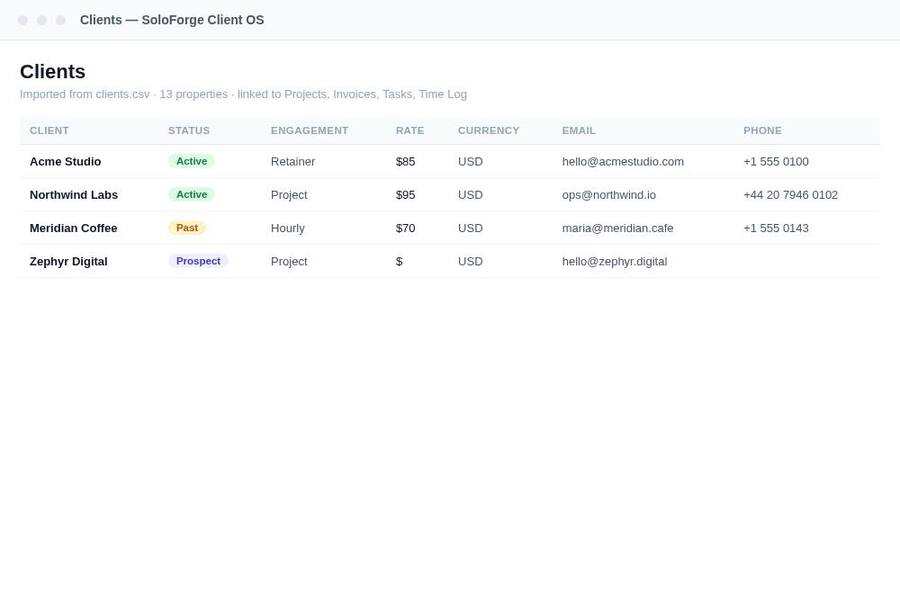
A real screenshot from inside the download — not a mock-up.
Why this works
Most solo professionals do not need more productivity apps. They need one place where the client list, the deadlines, the invoices and the notes already live together — and that nobody has to maintain by hand.
Client OS for Notion is that place. Six linked databases, twelve pre-built views, and a dashboard that answers the only three questions that matter on a Monday morning: who owes me money, what ships this week, and which client needs a reply today. Nothing is decorative. Every field was designed around a task you actually do.
Import the six CSV files, paste the pages, follow the setup guide, and you have a client system that a team of five would be happy to use — running on the free Notion plan.
What's inside
- 6 Notion-importable CSV databases with correct column headers and example rows
- 9 ready-made pages (Dashboard, Weekly Review, Proposal, Onboarding, Pricing, Notes)
- Formula reference sheet — every formula explained in plain English
- View-by-view setup guide with screenshots described step by step
- 30 AI prompts for turning notes, transcripts and emails into structured records
- Lifetime updates: every future version included
Who it's for
- Freelancers and independent consultants with 3+ active clients
- Solo agencies and small studios that bill per project
- Coaches, designers and developers who invoice monthly
- Anyone whose client list currently lives in three different apps
Inside the download
Every file, in the order you will meet it.
- 00-START-HERE.md — the 20-minute setup, step by step
- NOTION-SETUP.md — property types, formulas and the 12 views
- databases/ — 6 import-ready CSVs (Clients, Projects, Invoices, Tasks, Time Log, Testimonials)
- pages/ — 9 ready pages (Dashboard, Weekly Review, Proposal Template, Pricing Page, …)
- ai-prompts.md — prompts for turning the workspace into your own
Frequently asked
Do I need a paid Notion plan?
No. Everything here works on the free Notion plan. The only paid features mentioned in the guide are optional extras (like timeline views) and every alternative is noted.
How long does the setup take?
About 20 minutes for the core workspace, or about 40 minutes if you also set up the dashboard formulas and the linked views. The guide is ordered so you can stop after any step and still have something usable.
Is this just a page with empty tables?
No. Every database ships with example rows, the correct column types, pre-written formulas and the views that make each database useful. The difference between this and a free template is that it is already in the shape of a running business.
Will it work if my client data is messy?
Yes — there is a 20-minute clean-up routine in the guide, and the AI prompt pack converts pasted notes, email threads and call transcripts into structured rows for you.
What happens when you update the product?
You get the new files by email and in your download link. There is no subscription and no extra fee. Existing downloads keep working.
Can I use it for a team?
Yes, inside one Notion workspace. For separate workspaces with different permission levels, contact support and we will help you plan the split.
Get Client OS for Notion
Instant download, lifetime updates, 30-day refund.